Saturday, January 31, 2009

Learnings of the Week [ January 26-30, 2009 ]

In this week, Sir Balbuena is not around because he attended the Boy Scout Camp in Camiguin.

But in this week, he gave us an activity so that we have something to do while he was away. We must make our own webpage that shall be uploaded before or during the deadline. In this activity, we must apply what we have learned about html.


Posted by:

RAE ANGELINE S. PALEN
IV - Rizal

Friday, January 30, 2009

Learnings of the Week

Submitted by:
Joyce Niko D. Perez
IV- RIZAL

January 26-30, 2009

This week, sir Ernie is not around because he is in Camiguin..

We just uploaded our html documents on the server for our web page project to be checked next week..

learnings of the week Jan. 26-30

this week, Sir Balbuena is not around.
he gave us an activity for us to upload on server. in this activity, we should make our own website according to what we have learned about html.
by: Hanna Deborrah T. Ongking IV- Rizal

Saturday, January 24, 2009

learnings of the week jan 19-23

this week, Sir Balbuena introduced us to our new topic, HTML (Hypertext Mark Up Language).


HTML, an initialism of HyperText Markup Language, is the predominant markup language for Web pages. It provides a means to describe the structure of text-based information in a document — by denoting certain text as links, headings, paragraphs, lists, and so on — and to supplement that text with interactive forms, embedded images, and other objects. HTML is written in the form of tags, surrounded by angle brackets. HTML can also describe, to some degree, the appearance and semantics of a document, and can include embedded scripting language code (such as JavaScript) which can affect the behavior of Web browsers and other HTML processors.


HTML markup
HTML markup consists of several key components, including elements (and their attributes), character-based data types, and character references and entity references. Another important component is the document type declaration, which specifies the Document Type Definition.[citation needed] As of HTML 5, no Document Type Definition will need to be specified, and will only determine the layout mode.[citation needed]
The
Hello world program, a common computer program employed for comparing programming languages, scripting languages, and markup languages is made of 8 lines of code in HTML, albeit line breaks and the tag, or the document type declaration, are optional.


Elements are the basic structure for HTML markup. Elements have two basic properties: attributes and content. Each attribute and each element's content has certain restrictions that must be followed for a HTML document to be considered valid. An element usually has a start tag (e.g. ) and an end tag (e.g. ). The element's attributes are contained in the start tag and content is located between the tags (e.g. Content). Some elements, such as
, do not have any content and must not have a closing tag. Listed below are several types of markup elements used in HTML.


Structural markup describes the purpose of text.

Presentational markup describes the appearance of the text, regardless of its function. For example boldface indicates that visual output devices should render "boldface" in bold text, but gives no indication what devices which are unable to do this (such as aural devices that read the text aloud) should do. In the case of both bold and italic, there are elements which usually have an equivalent visual rendering but are more semantic in nature, namely strong emphasis and emphasis respectively. It is easier to see how an aural user agent should interpret the latter two elements. However, they are not equivalent to their presentational counterparts: it would be undesirable for a screen-reader to emphasize the name of a book, for instance, but on a screen such a name would be italicized. Most presentational markup elements have become deprecated under the HTML 4.0 specification, in favor of CSS based style design.

Attributes

Most of the attributes of an element are name-value pairs, separated by "=", and written within the start tag of an element, after the element's name. The value may be enclosed in single or double quotes, although values consisting of certain characters can be left unquoted in HTML (but not XHTML).[28][29] Leaving attribute values unquoted is considered unsafe.[30] In contrast with name-value pair attributes, there are some attributes that affect the element simply by their presence in the start tag of the element[2] (like the ismap attribute for the img element[31]).
Most elements can take any of several common attributes:

The id attribute provides a document-wide unique identifier for an element. This can be used by stylesheets to provide presentational properties, by browsers to focus attention on the specific element, or by scripts to alter the contents or presentation of an element.

The class attribute provides a way of classifying similar elements for presentation purposes. For example, an HTML document might use the designation class="notation" to indicate that all elements with this class value are subordinate to the main text of the document. Such elements might be gathered together and presented as footnotes on a page instead of appearing in the place where they occur in the HTML source.
An author may use the style non-attributal codes presentational properties to a particular element. It is considered better practice to use an element’s son- id page and select the element with a stylesheet, though sometimes this can be too cumbersome for a simple ad hoc application of styled properties.

The title attribute is used to attach subtextual explanation to an element. In most browsers this attribute is displayed as what is often referred to as a tooltip.
The generic inline element span can be used to demonstrate these various attributes:
HTML

This example displays as HTML; in most browsers, pointing the cursor at the abbreviation should display the title text "Hypertext Markup Language."
Most elements also take the language-related attributes lang and dir.

by: Hanna Deborrah T. Ongking IV-Rizal


Learnings of the Week [ January 19-23, 2009 ]

In this week, we discussed about HTML.

HTML

HTML, an initialism of HyperText Markup Language, is the predominant markup language for Web pages. It provides a means to describe the structure of text-based information in a document — by denoting certain text as links, headings, paragraphs, lists, and so on — and to supplement that text with interactive forms, embedded images, and other objects. HTML is written in the form of tags, surrounded by angle brackets. HTML can also describe, to some degree, the appearance and semantics of a document, and can include embedded scripting language code (such as JavaScript) which can affect the behavior of Web browsers and other HTML processors.

HTML MARKUP

HTML markup consists of several key components, including elements (and their attributes), character-based data types, and character references and entity references. Another important component is the document type declaration, which specifies the Document Type Definition. As of HTML 5, no Document Type Definition will need to be specified, and will only determine the layout mode.

ELEMENTS

Elements are the basic structure for HTML markup. Elements have two basic properties: attributes and content. Each attribute and each element's content has certain restrictions that must be followed for a HTML document to be considered valid. An element usually has a start tag (e.g. ) and an end tag (e.g. ). The element's attributes are contained in the start tag and content is located between the tags (e.g. Content). Some elements, such as
, do not have any content and must not have a closing tag. Listed below are several types of markup elements used in HTML.

Structural markup describes the purpose of text. For example,

Golf

establishes "Golf" as a second-level heading, which would be rendered in a browser in a manner similar to the "HTML markup" title at the start of this section. Structural markup does not denote any specific rendering, but most Web browsers have standardized on how elements should be formatted. Text may be further styled with Cascading Style Sheets (CSS).

Presentational markup describes the appearance of the text, regardless of its function. For example boldface indicates that visual output devices should render "boldface" in bold text, but gives no indication what devices which are unable to do this (such as aural devices that read the text aloud) should do. In the case of both bold and italic, there are elements which usually have an equivalent visual rendering but are more semantic in nature, namely strong emphasis and emphasis respectively. It is easier to see how an aural user agent should interpret the latter two elements. However, they are not equivalent to their presentational counterparts: it would be undesirable for a screen-reader to emphasize the name of a book, for instance, but on a screen such a name would be italicized. Most presentational markup elements have become deprecated under the HTML 4.0 specification, in favor of CSS based style design.

Hypertext markup links parts of the document to other documents. HTML up through version XHTML 1.1 requires the use of an anchor element to create a hyperlink in the flow of text: Wikipedia. However, the href attribute must also be set to a valid URL so for example the HTML code, Wikipedia, will render the word "Wikipedia" as a hyperlink.To link on an image, the anchor tag use the following syntax: alternative text

ATTRIBUTES

Most of the attributes of an element are name-value pairs, separated by "=", and written within the start tag of an element, after the element's name. The value may be enclosed in single or double quotes, although values consisting of certain characters can be left unquoted in HTML (but not XHTML). Leaving attribute values unquoted is considered unsafe.[30] In contrast with name-value pair attributes, there are some attributes that affect the element simply by their presence in the start tag of the element (like the ismap attribute for the img element).

Most elements can take any of several common attributes:

The id attribute provides a document-wide unique identifier for an element. This can be used by stylesheets to provide presentational properties, by browsers to focus attention on the specific element, or by scripts to alter the contents or presentation of an element.

The class attribute provides a way of classifying similar elements for presentation purposes. For example, an HTML document might use the designation class="notation" to indicate that all elements with this class value are subordinate to the main text of the document. Such elements might be gathered together and presented as footnotes on a page instead of appearing in the place where they occur in the HTML source.

An author may use the style non-attributal codes presentational properties to a particular element. It is considered better practice to use an element’s son- id page and select the element with a stylesheet, though sometimes this can be too cumbersome for a simple ad hoc application of styled properties.

The title attribute is used to attach subtextual explanation to an element. In most browsers this attribute is displayed as what is often referred to as a tooltip.

CHARACTER AND ENTITY REFERENCES

As of version 4.0, HTML defines a set of 252 character entity references and a set of 1,114,050 numeric character references, both of which allow individual characters to be written via simple markup, rather than literally. A literal character and its markup counterpart are considered equivalent and are rendered identically.

The ability to "escape" characters in this way allows for the characters < and & (when written as < and &, respectively) to be interpreted as character data, rather than markup. For example, a literal < normally indicates the start of a tag, and & normally indicates the start of a character entity reference or numeric character reference; writing it as & or & or & allows & to be included in the content of elements or the values of attributes. The double-quote character ("), when used to quote an attribute value, must also be escaped as " or " or " when it appears within the attribute value itself. The single-quote character ('), when used to quote an attribute value, must also be escaped as ' or ' (should NOT be escaped as ' except in XHTML documents) when it appears within the attribute value itself. However, since document authors often overlook the need to escape these characters, browsers tend to be very forgiving, treating them as markup only when subsequent text appears to confirm that intent.

Escaping also allows for characters that are not easily typed or that aren't even available in the document's character encoding to be represented within the element and attribute content. For example, the acute-accented e (é), a character typically found only on Western European keyboards, can be written in any HTML document as the entity reference é or as the numeric references é or é. The characters comprising those references (that is, the &, the ;, the letters in eacute, and so on) are available on all keyboards and are supported in all character encodings, whereas the literal é is not.

DATA TYPES

HTML defines several data types for element content, such as script data and stylesheet data, and a plethora of types for attribute values, including IDs, names, URIs, numbers, units of length, languages, media descriptors, colors, character encodings, dates and times, and so on. All of these data types are specializations of character data.

THE DOCUMENT TYPE DECLARATION

HTML documents are required to start with a Document Type Declaration (informally, a “doctype”). In browsers, the function of the doctype is selecting the rendering mode—particularly to avoid the quirks mode.

The original purpose of the doctype is to enable validation based on Document Type Definition (DTD) with SGML tools. The DTD to which the DOCTYPE refers contains machine-readable grammar specifying the permitted and prohibited content for a document conforming to such a DTD. Browsers do not read the DTD, however. HTML5 validation is not DTD-based, so in HTML5 the doctype does not refer to a DTD.


Posted by:

RAE ANGELINE S. PALEN
IV - Rizal

Friday, January 23, 2009

Learnings of the Week

Submitted by:
Joyce Niko D. Perez
IV-RIZAL

January 19-23, 2009

This week we discussed about HTML.
Webpages are written in HTML - a simple scripting language.

HTML is short for HyperText Markup Language.

* Hypertext is simply a piece of text that works as a link.


* Markup Language is a way of writing layout information within documents.


Basically an HTML document is a plain text file that contains text and nothing else.

When a browser opens an HTML file, the browser will look for HTML codes in the text and use them to change the layout, insert images, or create links to other pages.

Since HTML documents are just text files they can be written in even the simplest text editor.

A more popular choice is to use a special HTML editor - maybe even one that puts focus on the visual result rather than the codes - a so-called WYSIWYG editor ("What You See Is What You Get").

Some of the most popular HTML editors, such as FrontPage or Dreamweaver will let you create pages more or less as you write documents in Word or whatever text editor you're using.

However, there are some very good reasons to create your own pages - or parts of them - by hand...

Why learn HTML??

It is possible to create webpages without knowing anything about the HTML source behind the page.

There are excellent editors on the market that will take care of the HTML parts. All you need to do is layout the page.

However, if you want to make it above average in webdesign, it is strongly recommended that you understand these tags.

The most important benefits are:

* You can use tags the editor does not support.


* You can read the code of other people's pages, and "borrow" the cool effects.


* You can do the work yourself, when the editor simply refuses to create the effects you want.


You can write your HTML by hand with almost any available text editor, including notepad that comes as a standard program with Windows.

All you need to do is type in the code, then save the document, making sure to put an .html extension or an .htm extension to the file (for instance "mypage.html").

Saturday, January 17, 2009

Learnings of the Week [January 12-16, 2009]

In this week, we tackled about the ARRAYS.


ARRAYS

SINGLE-DIMENSIONAL ARRAYS
Array is a collection of variables of the same data type that is referenced by a common name.


ARRAY DECLARATION
The general form for any declaration is as follows:


type - is any valid data type in Turbo C which declares the type of values that array will hold

array_name - is a valid variable name which will name the array

size - defines how many elements the array will hold


ARRAY DECLARATION
The two declarations for arrays number and answer can be combined into a single declaration.


ARRAY INITIALIZATION
Arrays can give initial values during the declaration. This is called array initialization..


Most programming languages have a built-in array data type, although what is called an array in the language documentation is sometimes really an associative array. Conversely, the contiguous storage kind of array discussed here may alternatively be called a vector, list, or table.

Some programming languages support array programming (e.g., APL, newer versions of Fortran) which generalises operations and functions to work transparently over arrays as they do with scalars, instead of requiring looping over array members.

Multi-dimensional arrays are accessed using more than one index: one for each dimension. Multidimensional indexing reduced to a lesser number of dimensions, for example, a two-dimensional array with consisting of 6 and 5 elements respectively could be represented using a one-dimensional array of 30 elements.

Arrays can be classified as fixed-sized arrays (sometimes known as static arrays) whose size cannot change once their storage has been allocated, or dynamic arrays, which can be resized.


Arrays permit constant time (O(1)) random access to individual elements, which is optimal, but moving elements requires time proportional to the number of elements moved. On actual hardware, the presence of e.g. caches can make sequential iteration over an array noticeably faster than random access — a consequence of arrays having good locality of reference because their elements occupy contiguous memory locations — but this does not change the asymptotic complexity of access. Likewise, there are often facilities (such as memcpy) which can be used to move contiguous blocks of array elements faster than one can do through individual element access, but that does not change the asymptotic complexity either.

Memory-wise, arrays are compact data structures with no per-element overhead. There may be a per-array overhead, e.g. to store index bounds, but this is language-dependent. It can also happen that elements stored in an array require less memory than the same elements stored in individual variables, because several array elements can be stored in a single word; such arrays are often called packed arrays.

Properties in comparison

Dynamic arrays have similar characteristics to arrays, but can grow. The price for this is a memory overhead, due to elements being allocated but not used. With a constant per-element bound on the memory overhead, dynamic arrays can grow in constant amortized time per element.

Associative arrays provide a mechanism for array-like functionality without huge storage overheads when the index values are sparse. Specialized associative arrays with integer keys include Patricia tries and Judy arrays.

Balanced trees require O(log n) time for index access, but also permit inserting or deleting elements in Θ(log n) time. Arrays require O(n) time for insertion and deletion of elements.

Applications

Arrays are used to implement mathematical vectors and matrices, as well as other kinds of rectangular tables. In early programming languages, these were often the applications that motivated having arrays.

Because of their performance characteristics, arrays are used to implement other data structures, such as heaps, hash tables, deques, queues, stacks, strings, and VLists.

One or more large arrays are sometimes used to emulate in-program dynamic memory allocation, particularly memory pool allocation. Historically, this has sometimes been the only way to allocate "dynamic memory" portably.

Array accesses with statically predictable access patterns are a major source of data parallelism.

Some algorithms store a variable number of elements in part of a fixed-size array, which is equivalent to using dynamic array with a fixed capacity; the so-called Pascal strings are examples of this.


Indexing

The valid index values of each dimension of an array are a bounded set of integers (or values of some enumerated type). Programming environments that check indexes for validity are said to perform bounds checking.

Index of the first element

The index of the first element (sometimes called the "origin") varies by language. There are three main implementations: zero-based, one-based, and n-based arrays, for which the first element has an index of zero, one, or a programmer-specified value. The zero-based array is more natural in the root machine language and was popularized by the C programming language, where the abstraction of array is very weak, and an index n of a one-dimensional array is simply the offset of the element accessed from the address of the first (or "zeroth") element (scaled by the size of the element). One-based arrays are based on traditional mathematics notation for matrices and most, but not all, mathematical sequences. n-based is made available so the programmer is free to choose the lower bound, which may even be negative, which is most naturally suited for the problem at hand.

The Comparison of programming languages (array), indicates the base index used by various languages.

Supporters of zero-based indexing sometimes criticize one-based and n-based arrays for being slower. Often this criticism is mistaken when one-based or n-based array accesses are optimized with common subexpression elimination (for single dimensioned arrays) and/or with well-defined dope vectors (for multi-dimensioned arrays). However, in multidimensional arrays where the net offset into linear memory is computed from all of the indices, zero-based indexing is more natural, simpler, and faster. Edsger W. Dijkstra expressed an opinion in this debate: Why numbering should start at zero.

The 0-based/1-based debate is not limited to just programming languages. For example, the ground-floor of a building is elevator button "0" in France, but elevator button "1" in the USA.

Index of the last element

The relation between numbers appearing in an array declaration and the index of that array's last element also varies by language. In some languages (e.g. C) the number of elements contained in the arrays must be specified, whereas in others (e.g. Visual Basic .NET) the numeric value of the index of the last element must be specified.


Indexing methods

When an array is implemented as continuous storage, the index-based access, e.g. to element n, is simply done (for zero-based indexing) by using the address of the first element and adding n · sizeof(one element). So this is a Θ(1) operation.


Posted by:
RAE ANGELINE S. PALEN
IV - Rizal

Friday, January 16, 2009

Learnigs of the week- Jan 12-16,2009


THIS WEEK, WE HAVE DISCUSSED ABOUT ARRAYS


Array is a collection of variables of the same data type that is referenced by a common name. The two declarations for arrays number and answer can be combined into a single declaration:

int number[100] , answer [25];

Arrays can give initial values during the declaration. This is called array initialization..

int Array1[5]={25, 5, 7, 11, 163};

The general form for any declaration is as follows:

type array_name[size];

Where:

type is any valid data type in Turbo C which declares the type of values that array will hold.

array_name is a valid variable name which will name the array.

size defines how many elements the array will hold.

ARRAY DECLARATION

The two declarations for arrays number and answer can be combined into a single declaration.

ARRAY INITIALIZATION

Arrays can give initial values during the declaration. This is called array initialization..

Most programming languages have a built-in array data type, although what is called an array in the language documentation is sometimes really an associative array. Conversely, the contiguous storage kind of array discussed here may alternatively be called a vector, list, or table.Some programming languages support array programming (e.g., APL, newer versions of Fortran) which generalises operations and functions to work transparently over arrays as they do with scalars, instead of requiring looping over array members.Multi-dimensional arrays are accessed using more than one index: one for each dimension. Multidimensional indexing reduced to a lesser number of dimensions, for example, a two-dimensional array with consisting of 6 and 5 elements respectively could be represented using a one-dimensional array of 30 elements.Arrays can be classified as fixed-sized arrays (sometimes known as static arrays) whose size cannot change once their storage has been allocated, or dynamic arrays, which can be resized.Arrays permit constant time (O(1)) random access to individual elements, which is optimal, but moving elements requires time proportional to the number of elements moved. On actual hardware, the presence of e.g. caches can make sequential iteration over an array noticeably faster than random access — a consequence of arrays having good locality of reference because their elements occupy contiguous memory locations — but this does not change the asymptotic complexity of access. Likewise, there are often facilities (such as memcpy) which can be used to move contiguous blocks of array elements faster than one can do through individual element access, but that does not change the asymptotic complexity either.Memory-wise, arrays are compact data structures with no per-element overhead. There may be a per-array overhead, e.g. to store index bounds, but this is language-dependent. It can also happen that elements stored in an array require less memory than the same elements stored in individual variables, because several array elements can be stored in a single word; such arrays are often called packed arrays.

Indexing

The valid index values of each dimension of an array are a bounded set of integers (or values of some enumerated type). Programming environments that check indexes for validity are said to perform bounds checking.

Index of the first element

The index of the first element (sometimes called the "origin") varies by language. There are three main implementations: zero-based, one-based, and n-based arrays, for which the first element has an index of zero, one, or a programmer-specified value. The zero-based array is more natural in the root machine language and was popularized by the C programming language, where the abstraction of array is very weak, and an index n of a one-dimensional array is simply the offset of the element accessed from the address of the first (or "zeroth") element (scaled by the size of the element). One-based arrays are based on traditional mathematics notation for matrices and most, but not all, mathematical sequences. n-based is made available so the programmer is free to choose the lower bound, which may even be negative, which is most naturally suited for the problem at hand.The Comparison of programming languages (array), indicates the base index used by various languages.Supporters of zero-based indexing sometimes criticize one-based and n-based arrays for being slower. Often this criticism is mistaken when one-based or n-based array accesses are optimized with common subexpression elimination (for single dimensioned arrays) and/or with well-defined dope vectors (for multi-dimensioned arrays). However, in multidimensional arrays where the net offset into linear memory is computed from all of the indices, zero-based indexing is more natural, simpler, and faster. Edsger W. Dijkstra expressed an opinion in this debate: Why numbering should start at zero.The 0-based/1-based debate is not limited to just programming languages. For example, the ground-floor of a building is elevator button "0" in France, but elevator button "1" in the USA.

Index of the last element

The relation between numbers appearing in an array declaration and the index of that array's last element also varies by language. In some languages (e.g. C) the number of elements contained in the arrays must be specified, whereas in others (e.g. Visual Basic .NET) the numeric value of the index of the last element must be specified.

Indexing methods

When an array is implemented as continuous storage, the index-based access, e.g. to element n, is simply done (for zero-based indexing) by using the address of the first element and adding n · sizeof(one element). So this is a Θ(1) operation.


BY: Hanna Deborrah T. Ongking

Learnings of the Week

Submitted by:
Joyce Niko D. Perez
IV- RIZAL

Jan. 12-16, 2009


In computer science, an array[1] is a data structure consisting of a group of elements that are accessed by indexing. In most programming languages each element has the same data type and the array occupies a contiguous area of storage.

Most programming languages have a built-in array data type, although what is called an array in the language documentation is sometimes really an associative array. Conversely, the contiguous storage kind of array discussed here may alternatively be called a vector, list,[2] or table.[3]

Some programming languages support array programming (e.g., APL, newer versions of Fortran) which generalises operations and functions to work transparently over arrays as they do with scalars, instead of requiring looping over array members.

Multi-dimensional arrays are accessed using more than one index: one for each dimension. Multidimensional indexing reduced to a lesser number of dimensions, for example, a two-dimensional array with consisting of 6 and 5 elements respectively could be represented using a one-dimensional array of 30 elements.

Arrays can be classified as fixed-sized arrays (sometimes known as static arrays) whose size cannot change once their storage has been allocated, or dynamic arrays, which can be resized.

Properties

Arrays permit constant time (O(1)) random access to individual elements, which is optimal, but moving elements requires time proportional to the number of elements moved. On actual hardware, the presence of e.g. caches can make sequential iteration over an array noticeably faster than random access — a consequence of arrays having good locality of reference because their elements occupy contiguous memory locations — but this does not change the asymptotic complexity of access. Likewise, there are often facilities (such as memcpy) which can be used to move contiguous blocks of array elements faster than one can do through individual element access, but that does not change the asymptotic complexity either.

Memory-wise, arrays are compact data structures with no per-element overhead. There may be a per-array overhead, e.g. to store index bounds, but this is language-dependent. It can also happen that elements stored in an array require less memory than the same elements stored in individual variables, because several array elements can be stored in a single word; such arrays are often called packed arrays.

Properties in comparison

Dynamic arrays have similar characteristics to arrays, but can grow. The price for this is a memory overhead, due to elements being allocated but not used. With a constant per-element bound on the memory overhead, dynamic arrays can grow in constant amortized time per element.

Associative arrays provide a mechanism for array-like functionality without huge storage overheads when the index values are sparse. Specialized associative arrays with integer keys include Patricia tries and Judy arrays.

Balanced trees require O(log n) time for index access, but also permit inserting or deleting elements in Θ(log n) time.[4] Arrays require O(n) time for insertion and deletion of elements.

Applications

Arrays are used to implement mathematical vectors and matrices, as well as other kinds of rectangular tables. In early programming languages, these were often the applications that motivated having arrays.

Because of their performance characteristics, arrays are used to implement other data structures, such as heaps, hash tables, deques, queues, stacks, strings, and VLists.

One or more large arrays are sometimes used to emulate in-program dynamic memory allocation, particularly memory pool allocation. Historically, this has sometimes been the only way to allocate "dynamic memory" portably.

Array accesses with statically predictable access patterns are a major source of data parallelism.

Some algorithms store a variable number of elements in part of a fixed-size array, which is equivalent to using dynamic array with a fixed capacity; the so-called Pascal strings are examples of this.

Indexing


The valid index values of each dimension of an array are a bounded set of integers (or values of some enumerated type). Programming environments that check indexes for validity are said to perform bounds checking.

Index of the first element

The index of the first element (sometimes called the "origin") varies by language. There are three main implementations: zero-based, one-based, and n-based arrays, for which the first element has an index of zero, one, or a programmer-specified value. The zero-based array is more natural in the root machine language and was popularized by the C programming language, where the abstraction of array is very weak, and an index n of a one-dimensional array is simply the offset of the element accessed from the address of the first (or "zeroth") element (scaled by the size of the element). One-based arrays are based on traditional mathematics notation for matrices and most, but not all, mathematical sequences. n-based is made available so the programmer is free to choose the lower bound, which may even be negative, which is most naturally suited for the problem at hand.

The Comparison of programming languages (array), indicates the base index used by various languages.

Supporters of zero-based indexing sometimes criticize one-based and n-based arrays for being slower. Often this criticism is mistaken when one-based or n-based array accesses are optimized with common subexpression elimination (for single dimensioned arrays) and/or with well-defined dope vectors (for multi-dimensioned arrays). However, in multidimensional arrays where the net offset into linear memory is computed from all of the indices, zero-based indexing is more natural, simpler, and faster. Edsger W. Dijkstra expressed an opinion in this debate: Why numbering should start at zero.

The 0-based/1-based debate is not limited to just programming languages. For example, the ground-floor of a building is elevator button "0" in France, but elevator button "1" in the USA.

Index of the last element

The relation between numbers appearing in an array declaration and the index of that array's last element also varies by language. In some languages (e.g. C) the number of elements contained in the arrays must be specified, whereas in others (e.g. Visual Basic .NET) the numeric value of the index of the last element must be specified.

Indexing methods

When an array is implemented as continuous storage, the index-based access, e.g. to element n, is simply done (for zero-based indexing) by using the address of the first element and adding n · sizeof(one element). So this is a Θ(1) operation.

Multi-dimensional arrays

Ordinary arrays are indexed by a single integer. Also useful, particularly in numerical and graphics applications, is the concept of a multi-dimensional array, in which we index into the array using an ordered list of integers, such as in a[3,1,5]. The number of integers in the list used to index into the multi-dimensional array is always the same and is referred to as the array's dimensionality, and the bounds on each of these are called the array's dimensions. An array with dimensionality k is often called k-dimensional. One-dimensional arrays correspond to the simple arrays discussed thus far; two-dimensional arrays are a particularly common representation for matrices. In practice, the dimensionality of an array rarely exceeds three. Mapping a one-dimensional array into memory is obvious, since memory is logically itself a (very large) one-dimensional array. When we reach higher-dimensional arrays, however, the problem is no longer obvious. Suppose we want to represent this simple two-dimensional array:

\mathbf{A} = \begin{bmatrix} 1 & 2 & 3 \\ 4 & 5 & 6 \\ 7 & 8 & 9 \end{bmatrix}.

It is most common to index this array using the RC-convention, where elements are referred in row, column fashion or A_{row,col}\,, such as:

A_{1,1}=1,\ A_{1,2}=2,\ \ldots,\ A_{3,2}=8,\ A_{3,3}=9.\,

Common ways to index into multi-dimensional arrays include:

  • Row-major order. Used most notably by statically-declared arrays in C. The elements of each row are stored in order.
1 2 3 4 5 6 7 8 9
1 4 7 2 5 8 3 6 9
  • Arrays of arrays. Multi-dimensional arrays are typically represented by one-dimensional arrays of references (Iliffe vectors) to other one-dimensional arrays. The subarrays can be either the rows or columns.

A two-dimensional array stored as a one-dimensional array of one-dimensional arrays.

The first two forms are more compact and have potentially better locality of reference, but are also more limiting; the arrays must be rectangular, meaning that no row can contain more elements than any other. Arrays of arrays, on the other hand, allow the creation of ragged arrays, also called jagged arrays, in which the valid range of one index depends on the value of another, or in this case, simply that different rows can be different sizes. Arrays of arrays are also of value in programming languages that only supply one-dimensional arrays as primitives.

In many applications, such as numerical applications working with matrices, we iterate over rectangular two-dimensional arrays in predictable ways. For example, computing an element of the matrix product AB involves iterating over a row of A and a column of B simultaneously. In mapping the individual array indexes into memory, we wish to exploit locality of reference as much as we can. A compiler can sometimes automatically choose the layout for an array so that sequentially accessed elements are stored sequentially in memory; in our example, it might choose row-major order for A, and column-major order for B. Even more exotic orderings can be used, for example if we iterate over the main diagonal of a matrix.


Saturday, January 10, 2009

Learnings of the Week [January 5-9, 2009]

In this week, our lesson is about Recursion.

RECURSION

The repetitive process by which a function calls itself is called recursion or circular definition. This is a way of defining something in terms of itself. A function is said to be recursive if a statement in the body of the function calls the function that contains it.

PARTS OF THE RECURSIVE FUNCTION

Base Case

This is the part of the recursive function that is found on the if clause. This contains the condition that should be satisfied at one point of execution to terminate the repetitive process done by the recursive function.

General Case

This is the part of the recursive function that is found on the else-clause. This contains the function call of the recursive function to itself.

DIRECT RECURSION

Direct Recursions are recursive functions that can call itself through a function call directly inside the body of the function.

The examples presented on the earlier part of this presentation are examples of direct recursions.

INDIRECT RECURSION

Indirect Recursions are recursive functions that can call another functions outside its function.


Posted by:
RAE ANGELINE S. PALEN
IV - Rizal

Friday, January 9, 2009

Learnigs of the week- Jan 5-9, 2009


This week, we have discussed about RECURSION. Here are some of my learnings..


The repetitive process by which a functions calls itself is called recursion or circular definition. This is a way of defining something in terms of itself. A function is said to be recursive if a statement in the body of the function calls the function that contains it.

Base Case is the part of the recursive function that is found on the if clause. This contains the condition that should be satisfied at one point of execution to terminate the repetitive process done by the recursive function. General Case is the part of the recursive function that is found on the else-clause. This contains the function call of the recursive function to itself.

Direct recursions are recursive functions that can call itself through a function call directly inside the body of the function. Indirect recursions are recursive functions that can call another functions outside its function.


by: Hanna Deborrah T. Ongking IV-Rizal


Learnings of the Week

Submitted by:

Joyce Niko D. Perez

IV- RIZAL

JAN. 5-9, 2009

Recursion in computer science is a way of thinking about and solving problems. It is, in fact, one of the central ideas of computer science. [1] Solving a problem using recursion means the solution depends on solutions to smaller instances of the same problem. [2]

"The power of recursion evidently lies in the possibility of defining an infinite set of objects by a finite statement. In the same manner, an infinite number of computations can be described by a finite recursive program, even if this program contains no explicit repetitions." [3]

Most high-level computer programming languages support recursion by allowing a function to call itself within the program text. Imperative languages define looping constructs like “while” and “for” loops that are used to perform repetitive actions. Some functional programming languages do not define any looping constructs but rely solely on recursion to repeatedly call code. Computability theory has proven that these recursive only languages are mathematically equivalent to the imperative languages, meaning they can solve the same kinds of problems even without the typical control structures like “while” and “for”.

Recursive algorithms

A common method of simplification is to divide a problem into sub-problems of the same type. This is known as dialecting. As a computer programming technique, this is called divide and conquer, and it is key to the design of many important algorithms, as well as a fundamental part of dynamic programming.

Virtually all programming languages in use today allow the direct specification of recursive functions and procedures. When such a function is called, the computer (for most languages on most stack-based architectures) or the language implementation keeps track of the various instances of the function (on many architectures, by using a call stack, although other methods may be used). Conversely, every recursive function can be transformed into an iterative function by using a stack.

Most (but not all) functions and procedures that can be evaluated by a computer can be expressed in terms of a recursive function (without having to use pure iteration),[citation needed]continuation-passing style; conversely any recursive function can be expressed in terms of (pure) iteration, since recursion in itself is iterative too.[citation needed] In order to evaluate a function by means of recursion, it has to be defined as a function of itself (e.g. the factorial n! = n * (n - 1)! , where 0! is defined as 1). Clearly thus, not all function evaluations lend itself for a recursive approach. In general, all non-infinite functions can be described recursively directly; infinite functions (e.g. the series for e = 1/1! + 2/2! + 3/3!...) need an extra 'stopping criterium', e.g. the number of iterations, or the number of significant digits, because otherwise recursive iteration would result in an endless loop. in

To make a very literal example out of this: If an unknown word is seen in a book, the reader can make a note of the current page number and put the note on a stack (which is empty so far). The reader can then look the new word up and, while reading on the subject, may find yet another unknown word. The page number of this word is also written down and put on top of the stack. At some point an article is read that does not require any explanation. The reader then returns to the previous page number and continues reading from there. This is repeated, sequentially removing the topmost note from the stack. Finally, the reader returns to the original book. This is a recursive approach.

Some languages designed for logic programming and functional programming provide recursion as the only means of repetition directly available to the programmer. Such languages generally make tail recursion as efficient as iteration, letting programmers express other repetition structures (such as Scheme's map and for) in terms of recursion.

Recursion is deeply embedded in the theory of computation, with the theoretical equivalence of μ-recursive functions and Turing machines at the foundation of ideas about the universality of the modern computer.


Recursive programming

Creating a recursive procedure essentially requires defining a "base case", and then defining rules to break down more complex cases into the base case. Key to a recursive procedure is that with each recursive call, the problem domain must be reduced in such a way that eventually the base case is arrived at.

Some authors classify recursion as either "generative" or "structural". The distinction is made based on where the procedure gets the data that it works on. If the data comes from a data structure like a list, then the procedure is "structurally recursive"; otherwise, it is "generatively recursive".[4]

Many well-known recursive algorithms generate an entirely new piece of data from the given data and recur on it. HTDP (How To Design Programs) refers to this kind as generative recursion. Examples of generative recursion include: gcd, quicksort, binary search, mergesort, Newton's method, fractals, and adaptive integration.[5]

Examples of recursively defined procedures (generative recursion)

Factorial

A classic example of a recursive procedure is the function used to calculate the factorial of an integer.

Function definition: 0 \\ \end{cases}" src="http://upload.wikimedia.org/math/9/6/7/967ff33812b62076e5de85fe7fb40b83.png">

Pseudocode (recursive):
function factorial is:
input: integer n such that n >= 1
output: [n × (n-1) × (n-2) × … × 1]

1. if n is 0, return 1
2. otherwise, return [ n × factorial(n-1) ]

end factorial


A recurrence relation is an equation that relates later terms in the sequence to earlier terms[6].
Recurrence relation for factorial:
bn = n * bn-1
b0 = 1

Computing the recurrence relation for n = 4:
b4           = 4 * b3
= 4 * 3 * b2
= 4 * 3 * 2 * b1
= 4 * 3 * 2 * 1 * b0
= 4 * 3 * 2 * 1 * 1
= 4 * 3 * 2 * 1
= 4 * 3 * 2
= 4 * 6
= 24


Example Implementations:

Scheme (recursive) C (recursive)
;; Input: Integer n such that n >= 0
(define (fact n)
(if (= n 0)
1
(* n (fact (- n 1)))))
//INPUT: n is an integer such that n >= 0
int fact(int n)
{
if (n == 0)
return 1;
else
return n * fact(n - 1);
}

This factorial function can also be described without using recursion by making use of the typical looping constructs found in imperative programming languages:

Pseudocode (iterative):
function factorial is:
input: integer n such that n >= 0
output: [n × (n-1) × (n-2) × … × 1]

1. create new variable called running_total with a value of 1

2. begin loop
1. if n is 0, exit loop
2. set running_total to (running_total × n)
3. decrement n
4. repeat loop

3. return running_total

end factorial

Scheme, however, is a functional programming language and does not define any looping constructs. It relies solely upon recursion to perform all looping. Because Scheme is tail-recursive, a recursive procedure can be defined that implements the factorial procedure as an iterative process — meaning that it uses constant space but linear time.

Example implementations:

Scheme (iterative) C (iterative)
;; Input: Integer n such that n >= 0
(define (fact n)
(fact-iter 1 n))

(define (fact-iter running_total n)
(if (= n 0)
running_total
(fact-iter (* running_total n) (- n 1))))
int fact(int n)
{
int running_total;
for (running_total = 1; n != 0; --n)
running_total *= n;
return running_total;
}

Fibonacci

Another well known recursive sequence is the Fibonacci numbers. The first few elements of this sequence are: 0, 1, 1, 2, 3, 5, 8, 13, 21...

Function definition: = 2 \\ \end{cases}" src="http://upload.wikimedia.org/math/6/4/1/641cfaf770e827d00de07ea38d67a409.png">

Pseudocode
function fib is:
input: integer n such that n >= 0

1. if n is 0, return 0
2. if n is 1, return 1
3. otherwise, return [ fib(n-1) + fib(n-2) ]

end fib


Recurrence relation for Fibonacci:
bn = bn-1 + bn-2
b1 = 1, b0 = 0

Computing the recurrence relation for n = 4:
  b4            = b3 + b2
= b2 + b1 + b1 + b0
= b1 + b0 + 1 + 1 + 0
= 1 + 0 + 1 + 1 + 0
= 3

Example Implementations:

Scheme C
;; n is an integer such that n >= 0
(define (fib n)
(cond ((= n 0) 0)
((= n 1) 1)
(else
(+ (fib (- n 1))
(fib (- n 2))))))
int fib(int n)
{
if (n == 0)
return 0;
else if (n == 1)
return 1;
else
return fib(n-1) + fib(n-2);
}

These implementations are especially bad because each time the function is executed, it will make two function calls to itself each of which in turn makes two more function calls and so on until they "bottom out" at 1 or 0. This is an example of "tree recursion", and grows exponentially in time and linearly in space requirements.[7]

Greatest common divisor

Another famous recursive function is the Euclidean algorithm, used to compute the greatest common divisor of two integers.

Function definition: = y \mbox{ and } y > 0 \\ \end{cases}" src="http://upload.wikimedia.org/math/1/b/8/1b8b7cd5c6ac28e64e273cc523eeba83.png">

Pseudocode (recursive):
function gcd is:
input: integer x, integer y such that x >= y and y > 0

1. if y is 0, return x
2. otherwise, return [ gcd( y, (remainder of x/y) ) ]

end gcd

Recurrence relation for greatest common divisor, where "x % y" expresses the remainder of x / y:
gcd(x,y) = gcd(y, x % y)
gcd(x,0) = x

Computing the recurrence relation for x = 27 and y = 9:
gcd(27, 9)   = gcd(9, 27 % 9)
= gcd(9, 0)
= 9
Computing the recurrence relation for x = 259 and y = 111:
gcd(259, 111)   = gcd(111, 259 % 111)
= gcd(111, 37)
= gcd(37, 0)
= 37


Example Implementations:

Scheme (recursive) C (recursive)
;; Input: Integers x, y such that x >= y and y > 0
(define (gcd x y)
(if (= y 0)
x
(gcd y (remainder x y))))
int gcd(int x, int y)
{
if (y == 0)
return x;
else
return gcd(y, x % y);
}

Notice that both "recursive" examples above are in fact merely tail-recursive, which means they are equivalent to an iterative algorithm. Below is the same algorithm using explicit iteration. It does not accumulate a chain of deferred operations; rather, its state is maintained entirely in the variables x and y. Its "number of steps grows the as the logarithm of the numbers involved."[8]

Pseudocode (iterative): C (iterative)
function gcd is:
input: integer x, integer y such that x >= y and y > 0

1. create new variable called remainder

2. begin loop
1. if y is zero, exit loop
2. set remainder to the remainder of x/y
3. set x to y
4. set y to remainder
5. repeat loop

3. return x

end gcd
int gcd(int x, int y)
{
while (y != 0) {
int remainder = x % y;
x = y;
y = remainder;
}
return x;
}

The iterative algorithm requires a temporary variable, and even given knowledge of the Euclidean algorithm it is more difficult to understand the process by simple inspection, although the two algorithms are very similar in their steps.

Towers of Hanoi


For a full discussion of this problem's description, history and solution see the main article or one of the many references.[9] [10] Simply put the problem is this: given three pegs, one with a set of N disks of increasing size, determine the minimum (optimal) number of steps it take to move all the disks from their initial position to another peg without placing a larger disk on top of a smaller one.

Function definition: 1\\ \end{cases}" src="http://upload.wikimedia.org/math/e/0/4/e04876320ec8eb50bd4a66ae0f46b725.png">
Recurrence relation for hanoi:
hn = 2*hn-1+1
h1 = 1

Computing the recurrence relation for n = 4:
hanoi(4)     = 2*hanoi(3) + 1
= 2*(2*hanoi(2) + 1) + 1
= 2*(2*(2*hanoi(1) + 1) + 1) + 1
= 2*(2*(2*1 + 1) + 1) + 1
= 2*(2*(3) + 1) + 1
= 2*(7) + 1
= 15


Example Implementations:

Scheme (programming language): C (programming language):
;; Input: Integer n such that n >= 1
(define (hanoi n)
(if (= n 1)
1
(+ (* 2 (hanoi (- n 1)))
1)))
/* Input: Integer n such that n >= 1 */
int hanoi(int n)
{
if (n == 1)
return 1;
else
return 2*hanoi(n-1) + 1;
}


Although not all recursive functions have an explicit solution, the Tower of Hanoi sequence can be reduced to an explicit formula. [11]

An explicit formula for Towers of Hanoi:
h1 = 1   = 21 - 1
h2 = 3 = 22 - 1
h3 = 7 = 23 - 1
h4 = 15 = 24 - 1
h5 = 31 = 25 - 1
h6 = 63 = 26 - 1
h7 = 127 = 27 - 1
In general:
hn = 2n - 1, for all n >=

Binary search

The binary search algorithm is a method of searching an ordered array for a single element by cutting the array in half with each pass. The trick is to pick a midpoint near the center of the array, compare the data at that point with the data being searched and then responding to one of three possible conditions: the data is found, the data at the midpoint is greater than the data being searched for, or the data at the midpoint is less than the data being searched for.

Recursion is used in this algorithm because with each pass a new array is created by cutting the old one in half. The binary search procedure is then called recursively, this time on the new (and smaller) array. Typically the array's size is adjusted by manipulating a beginning and ending index. The algorithm exhibits a logarithmic order of growth because it essentially divides the problem domain in half with each pass.

Example Implementation of Binary Search:

 /*
Call binary_search with proper initial conditions.

INPUT:
data is a array of integers SORTED in ASCENDING order,
toFind is the integer to search for,
count is the total number of elements in the array

OUTPUT:
result of binary_search

*/

int search(int *data, int toFind, int count)
{
// Start = 0 (beginning index)
// End = count - 1 (top index)
return binary_search(data, toFind, 0, count-1);
}

/*
Binary Search Algorithm.

INPUT:
data is a array of integers SORTED in ASCENDING order,
toFind is the integer to search for,
start is the minimum array index,
end is the maximum array index
OUTPUT:
position of the integer toFind within array data,
-1 if not found
*/

int binary_search(int *data, int toFind, int start, int end)
{
//Get the midpoint.
int mid = start + (end - start)/2; //Integer division

//Stop condition.
if (start > end)
return -1;
else if (data[mid] == toFind) //Found?
return mid;
else if (data[mid] > toFind) //Data is greater than toFind, search lower half
return binary_search(data, toFind, start, mid-1);
else //Data is less than toFind, search upper half
return binary_search(data, toFind, mid+1, end);
}

Recursive data structures (structural recursion)

An important application of recursion in computer science is in defining dynamic data structures such as Lists and Trees. Recursive data structures can dynamically grow to a theoretically infinite size in response to runtime requirements; in contrast, a static array's size requirements must be set at compile time.

"Recursive algorithms are particularly appropriate when the underlying problem or the data to be treated are defined in recursive terms." [12]

The examples in this section illustrate what is known as "structural recursion". This term refers to the fact that the recursive procedures are acting on data that is defined recursively.

As long as a programmer derives the template from a data definition, functions employ structural recursion. That is, the recursions in a function's body consume some immediate piece of a given compound value. [13]

Linked lists

Below is a simple definition of a linked list node. Notice especially how the node is defined in terms of itself. The "next" element of struct node is a pointer to a struct node.

struct node
{
int n; // some data
struct node *next; // pointer to another struct node
};

// LIST is simply a synonym for struct node * (aka syntactic sugar).
typedef struct node *LIST;

Procedures that operate on the LIST data structure can be implemented naturally as a recursive procedure because the data structure it operates on (LIST) is defined recursively. The printList procedure defined below walks down the list until the list is empty (NULL), for each node it prints the data element (an integer). In the C implementation, the list remains unchanged by the printList procedure.

void printList(LIST lst)
{
if (!isEmpty(lst)) // base case
{
printf("%d ", lst->n); // print integer followed by a space
printList(lst->next); // recursive call
}
}

Binary trees

Below is a simple definition for a binary tree node. Like the node for Linked Lists, it is defined in terms of itself (recursively). There are two self-referential pointers - left (pointing to the left sub-tree) and right (pointing to the right sub-tree).

struct node
{
int n; // some data
struct node *left; // pointer to the left subtree
struct node *right; // point to the right subtree
};

// TREE is simply a synonym for struct node * (aka syntactic sugar).
typedef struct node *TREE;

Operations on the tree can be implemented using recursion. Note that because there are two self-referencing pointers (left and right), that tree operations will require two recursive calls. For a similar example see the Fibonacci function and explanation above.

void printTree(TREE t) {
if (!isEmpty(t)) { // base case
printTree(t->left); // go left
printf("%d ", t->n); // print the integer followed by a space
printTree(t->right); // go right
}
}

The above example illustrates an in-order traversal of the binary tree. A Binary search tree is a special case of the binary tree where the data elements of each node are in order.

Recursion versus iteration

In the "factorial" example the iterative implementation is likely to be slightly faster in practice than the recursive one. This is almost definite for the Euclidean Algorithm implementation. This result is typical, because iterative functions do not pay the "function-call overhead" as many times as recursive functions, and that overhead is relatively high in many languages. (Note that an even faster implementation for the factorial function on small integers is to use a lookup table.)

There are other types of problems whose solutions are inherently recursive, because they need to keep track of prior state. One example is tree traversal; others include the Ackermann function and divide-and-conquer algorithms such as Quicksort. All of these algorithms can be implemented iteratively with the help of a stack, but the need for the stack arguably nullifies the advantages of the iterative solution.

Another possible reason for choosing an iterative rather than a recursive algorithm is that in today's programming languages, the stack space available to a thread is often much less than the space available in the heap, and recursive algorithms tend to require more stack space than iterative algorithms. However, see the caveat below regarding the special case of tail recursion.

Tail-recursive functions

Tail-recursive functions are functions ending in a recursive call that does not build-up any deferred operations. For example, the gcd function (re-shown below) is tail-recursive; however, the factorial function (also re-shown below) is "augmenting recursive" because it builds up deferred operations that must be performed even after the final recursive call completes. With a compiler that automatically optimizes tail-recursive calls, a tail-recursive function such as gcd will execute using constant space. Thus the process it generates is iterative and equivalent to using imperative language control structures like the "for" and "while" loops.

Tail recursion: Augmenting recursion:
//INPUT: Integers x, y such that x >= y and y > 0
int gcd(int x, int y)
{
if (y == 0)
return x;
else
return gcd(y, x % y);
}
//INPUT: n is an Integer such that n >= 1
int fact(int n)
{
if (n == 1)
return 1;
else
return n * fact(n - 1);
}

The significance of tail recursion is that when making a tail-recursive call, the caller's return position need not be saved on the call stack; when the recursive call returns, it will branch directly on the previously saved return position. Therefore, on compilers which support tail-recursion optimization, tail recursion saves both space and time.

Order of function calling

The order of calling a function may change the execution of a function, see this example in C language:

Function 1

void recursiveFunction(int num) {
if (num < 5) {
printf("%d\n", num);
recursiveFunction(num + 1);
}
}
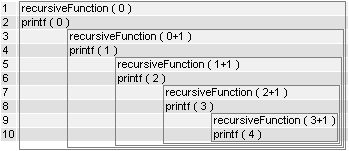
Image:RecursiveFunction1 execution.png

Function 2 with swapped lines

void recursiveFunction(int num) {
if (num < 5) {
recursiveFunction(num + 1);
printf("%d\n", num);
}
}

Image:RecursiveFunction2 execution.png

Direct and indirect recursion

Direct recursion is when function calls itself. Indirect recursion is when (for example) function A calls function B, function B calls function C, and then function C calls function A. Long chains and branches are possible, see Recursive descent parser.